How it works

From download to your first chat, in a minute

Simit connects you with the people who have your number, and only them. Your messages pass through our servers and then they're gone. Here's how it works.

Getting started in four steps

1

Verify your number

Enter your phone number and the one-time code we text you. No email, no password.

2

Sync or add contacts

Let Simit check your address book for friends (numbers only, names stay on your phone), or add people one by one.

3

Get matched

When you both have each other's number saved, you're matched. Simit updates this live.

4

Start chatting

Send messages and photos one-on-one, or create a group and invite your contacts.

Behind the scenes

What happens when you send a message

Our servers are a relay, not an archive. Here's the whole journey.

  1. 1 Your phone

    You write a message. It's saved on your phone. Photos are encrypted here with their own random key.

  2. 2 Encrypted connection

    It travels to Simit over TLS, so it can't be read on the network along the way.

  3. 3 Simit relay

    Our server holds it only until your friend's phone picks it up. It isn't end-to-end encrypted while it waits.

  4. 4 Their phone

    Your friend's phone saves the message and confirms it arrived. You see it marked Delivered.

  5. 5 Deleted from our servers

    The message is permanently deleted from our servers. If they never come online, it's deleted after 30 days.

For 30 days we keep only a content-free delivery record (message ID, chat ID, sender ID and time) so delete for everyone and reporting keep working. Edits, deletes and read receipts travel the same way and are deleted once delivered. See everything we keep.

Step 1

Verify your phone number

Open Simit, choose your country code and enter your number. We text you a one-time code. Type it in and your account is ready. Add a display name and, if you like, a photo. We recommend setting a Registration Lock PIN too.
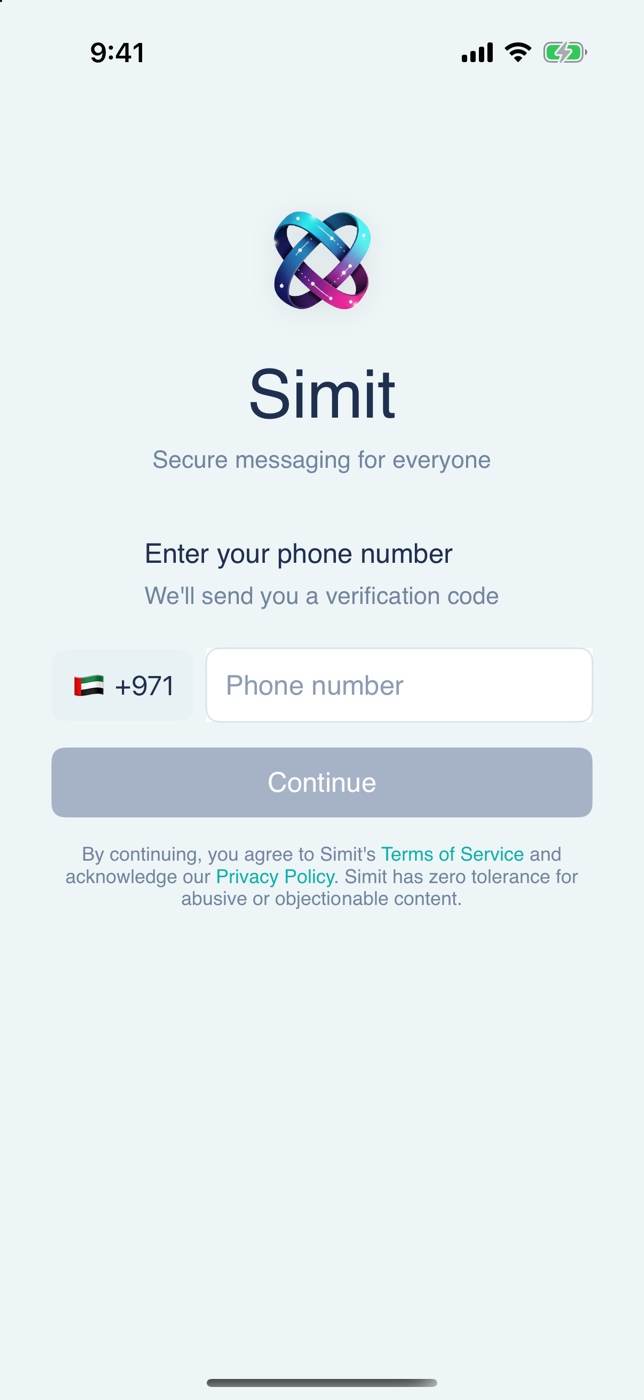
The Simit welcome screen asking for a phone number to sign in
Step 2

Sync or add your contacts

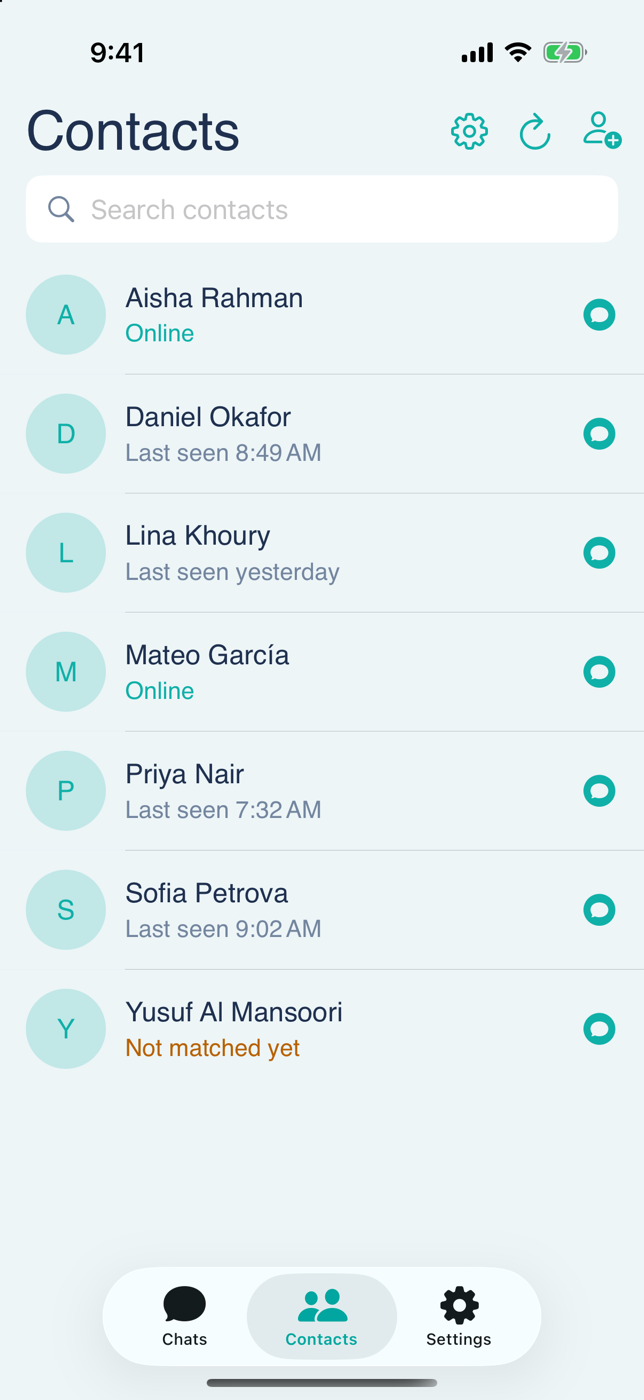
Give Simit access to your contacts to see which friends already use it, or skip that and add people individually by phone number. Only numbers are checked, using keyed hashes. The names you saved never leave your phone.

The Simit contacts screen listing friends with their online status, one marked Not matched yet
Step 3

Get matched, then chat

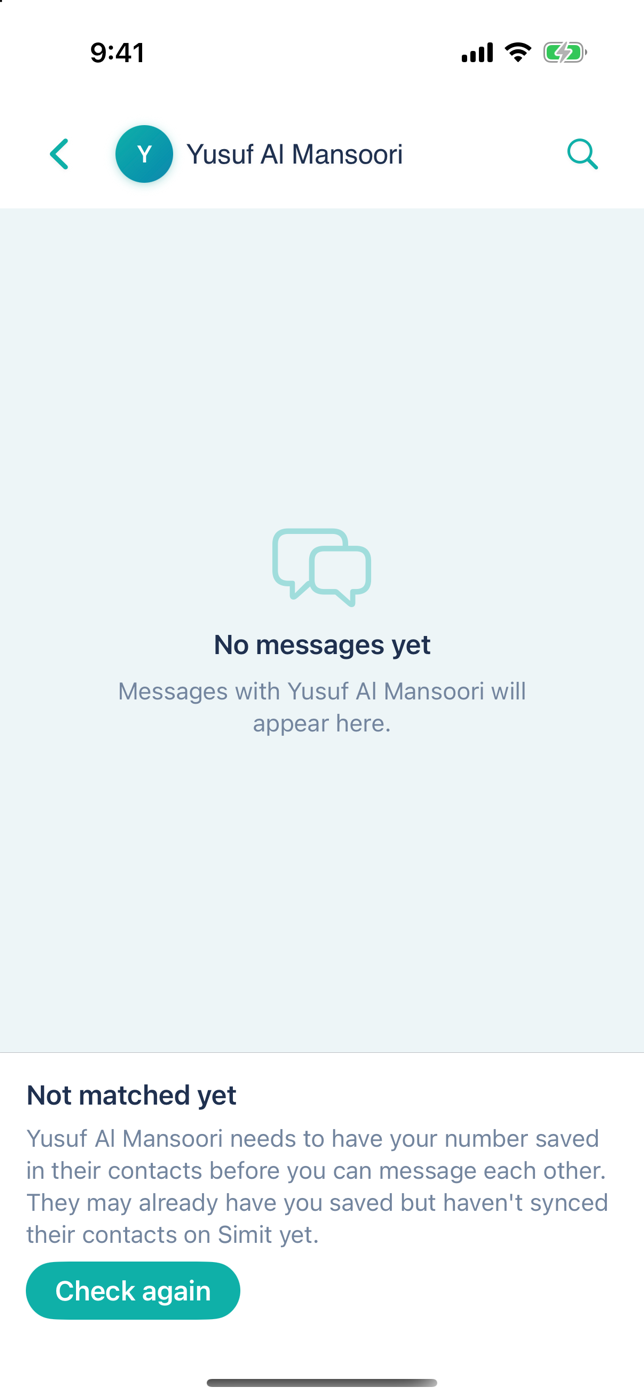
As soon as you both have each other saved, the chat unlocks. If one side is still missing, the chat shows a Not matched yet banner instead, and it updates the moment things change.

A Simit direct chat showing the Not matched yet banner with a Check again button
Step 4

Chat one-on-one or in groups

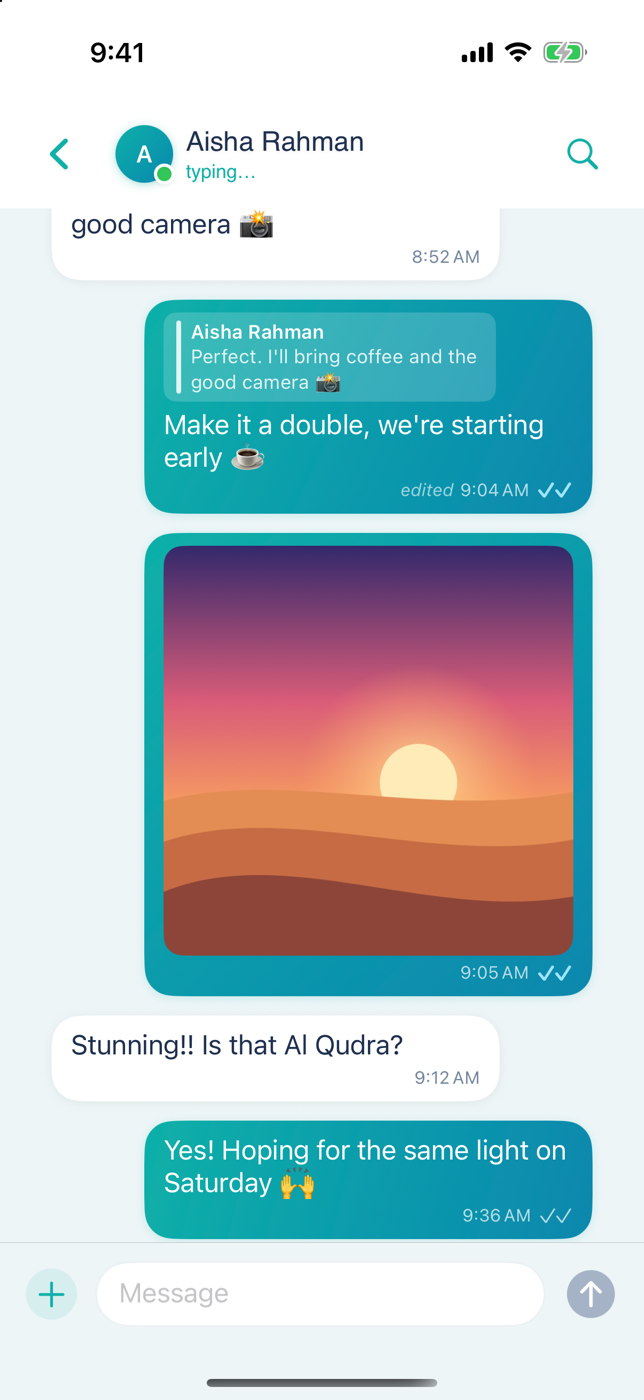
Message in real time, share photos, reply to messages and see typing and read receipts. Create a group from your contacts. Each person gets an invite and joins only if they accept.

A one-on-one Simit conversation with a quoted reply, an edited message, a shared sunset photo and read receipts
Matching

What “matched” means

Two people are matched when each has the other's phone number saved, either from their address book or added in Simit.

You have their number

Saved in your contacts and synced, or added in Simit.

They have yours

Saved in their contacts, and synced on Simit.

You're matched

Direct messages are unlocked for both of you.

Not matched yet?

Why someone shows “Not matched yet”

You have their number, but Simit can't see yours on their side yet. Usually that's for one of these reasons:

  • They don't have your number saved. Ask them to add you to their contacts.
  • They haven't synced their contacts on Simit yet. They may already have you saved. Opening Simit and refreshing Contacts will sync it.
  • Your number is saved differently. Make sure it includes the right country code.

As soon as it's fixed, the banner disappears by itself. Or tap Check again.

A Simit direct chat showing the Not matched yet banner with a Check again button

Every match status, explained

Here's what you might see in a direct chat.

Matched

You both have each other saved. Chat away. No banner is shown.

Not matched yet

They need to have your number saved in their contacts before you can message each other. They may already have you saved but haven't synced their contacts on Simit yet. Tap Check again to refresh.

Add them

They already have your number. Add them to your contacts to start chatting. Tap Add and you're matched.

You blocked them

You blocked this person. Tap Unblock if you'd like to talk again.

Group chats work differently: they use invites, so you can talk with members you haven't matched with, after you accept.

Ready when you are

Download Simit, verify your number and see which friends are already here.

Requires iPhone. Questions first? Visit Support.